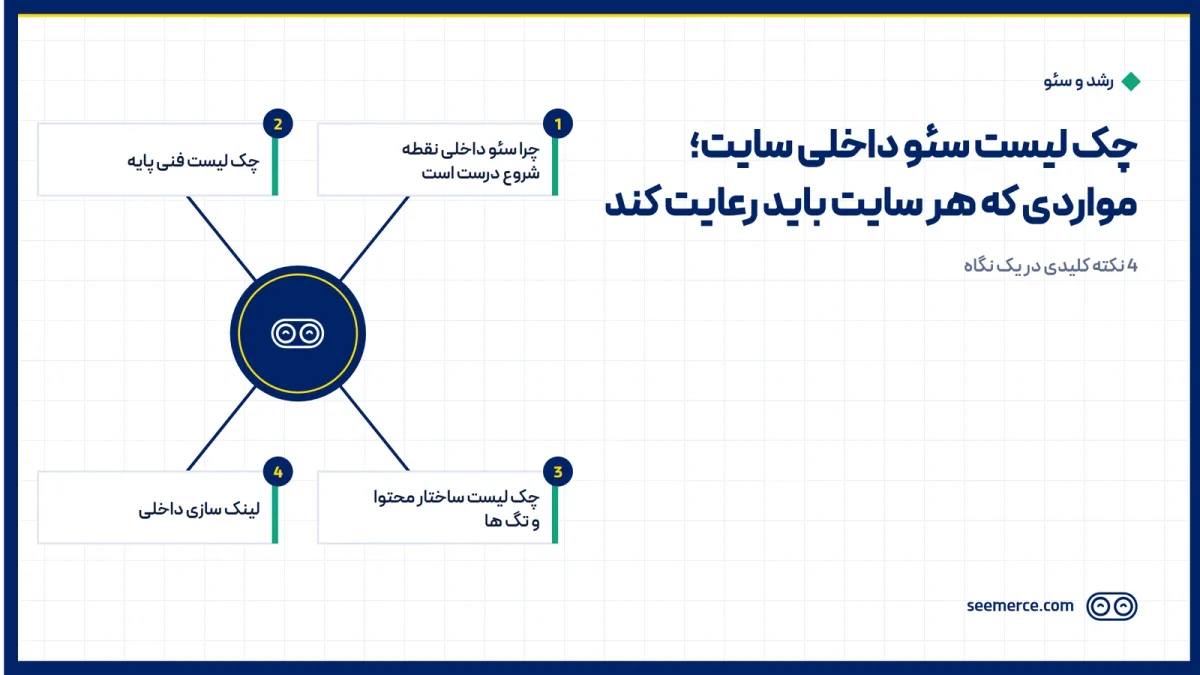
On-page SEO is the part of SEO fully within your own control; unlike backlinks, which depend on other sites' decisions, these items can be reviewed and fixed on your own site today. This checklist covers exactly what gets reviewed in a real technical audit, in priority order, without jargon.
Why on-page SEO is the right place to start
Before any link building or new content production, you need to make sure the site itself has no issue blocking it from being seen. It doesn't matter how good your content is; if Google can't read or index the page properly, that content never shows up in results. That's why on-page SEO is always the first step of any SEO project, not the last.
Basic technical checklist
These items make up the site's technical foundation and need to be right before anything else:
- Load speed: the homepage and high-traffic pages should load within a few seconds, on both mobile and desktop. Low speed hurts both ranking and bounce rate.
- Mobile version: Google indexes a site mainly from its mobile version; if the mobile version is broken or incomplete, even a great desktop version won't help.
- Indexability: checking that robots.txt or a noindex tag isn't accidentally hiding important pages from Google.
- Sitemap: an up-to-date XML file that introduces the addresses of all important pages to Google.
- HTTPS and SSL certificate: a secure connection on every page, with no mixed content triggering a security warning.
Content structure and tags checklist
After the technical foundation, next come the elements seen directly on each page:
- Title tag: every page should have a unique title that contains the target keyword and also encourages the user to click — not just a repeat of the brand name.
- Meta description: an honest summary of the page's content, around 150–160 characters, shown under the title in search results.
- H1–H3 structure: every page should have exactly one H1, with subheadings (H2, H3) breaking down the topic in logical order, not just for visual shape.
- Clean URL: a short, readable page address that includes the target keyword, without extra meaningless parameters.
- Optimized images: compressed file size and descriptive alt text for every image, both for speed and accessibility.
Internal linking
Internal link structure is one of the most overlooked parts of on-page SEO. Every page should get at least one link from another related page, so users can find their next step and Google understands how important that page is within the site's structure. Pages with no internal links pointing to them ("orphan pages") usually get indexed later and rank worse.
A simple rule: when you write something related to the topic of another page on the site, link to it. For example, if you're writing about SEO and mention content production, linking to the related page helps both the user and the site's internal structure.
Duplicate content and canonical tags
A common mistake, especially on online stores, is having several different URLs for the same content — for example, a product page with different filter parameters. If the canonical tag isn't set correctly, Google might see these pages as competing with each other and not give full authority to any of them. Designating one main version of the content and pointing other versions to it fixes this problem.
Structured data (Schema)
Proper schema markup helps Google understand a page's content more precisely — for example, article schema, review schema, or FAQ schema. This doesn't always directly raise ranking, but it can improve how the result looks in Google (like showing a star rating or an FAQ accordion), which itself raises the click-through rate.
How to prioritize when time is limited
A lot of sites don't have all of these in place at once, and that's normal; the right question isn't "is everything perfect," it's "where do we start to get the biggest impact with the least time." The suggested order is usually: first, technical issues blocking indexing (since without indexing, none of the other fixes matter), then load speed, then title tags and meta descriptions on high-traffic pages, and finally internal link structure and schema. This order means the first noticeable results appear sooner, which also keeps motivation for the project high.
A common mistake is spending all the time on one page (usually the homepage), while pages that directly drive sales or contact (service and product pages) deserve higher priority for these fixes; the homepage usually targets broader, more competitive keywords that take longer to show results.
Tools you need for monitoring
On-page SEO means nothing without measurement. At least two free tools should be active from day one: Google Search Console, which shows what terms your site appears for and how many clicks it gets, and Google Analytics, which shows user behavior after they land on the site. Without this data, any decision about which page needs fixing is just a guess, not analysis.
Where this checklist fits in the bigger SEO project
On-page SEO is where every technical SEO audit starts, but it's not the whole story. Once these items are fixed, next comes producing new content based on real user intent and building domain authority through backlinks. The website SEO page explains these three layers as a defined pipeline and shows the path after this checklist is complete.
What we don't do
On-page SEO has limits, and that needs to be said honestly:
- We don't fix speed with a miracle plugin. If the problem is a weak host or heavy code, that root cause needs to be fixed; full details are in the website speed guide.
- Mechanical keyword stuffing isn't recommended. Excessive repetition of the target keyword in text doesn't help today and can get flagged as spam.
- Rank isn't guaranteed by technical fixes alone. On-page SEO is a necessary condition, not a sufficient one; without proper content and domain authority, this checklist alone won't bring high rankings.
Frequently asked questions
Where should you start with this checklist?
Usually with speed and indexability, because if Google can't read the page properly, the rest of the fixes won't show their effect. After that comes title tags and content structure.
Is this checklist a one-time job?
No. It needs to be reviewed again with every new piece of content or site structure change; a periodic audit (say, quarterly) helps catch new issues early.
How do I know which items on this checklist my site is missing?
The simplest way is running a technical analysis on the site's address that reviews and scores each item separately and pinpoints exactly which part needs fixing.
Does on-page SEO differ for a WordPress site?
The principles are the same, but the implementation tools differ; on WordPress, most of these items are managed with SEO plugins, though setting those plugins up correctly still requires technical knowledge. For WooCommerce stores, a significant part of this checklist revolves around managing category pages and fixing duplicate content caused by product filters, since those pages usually generate the largest share of organic traffic for a store.

Comments and questions
No comments yet. If you have a question, we'd be glad to hear it.
Write a comment