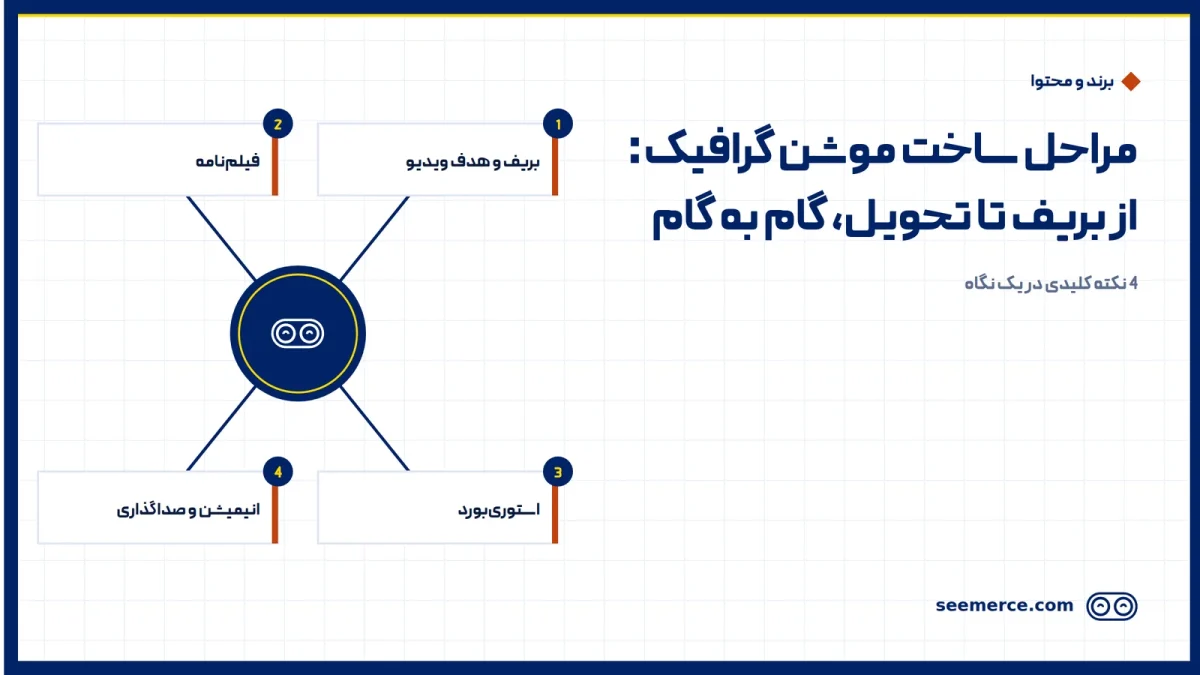
Making a motion graphic video at a well-run studio usually follows eight steps in order: brief, script, storyboard, style frames, animatic, animation, sound, and revisions with delivery. You make the key calls at three points: approving the script, approving the storyboard and visual style, and approving the first animation draft. A 60-second video in a simple style usually takes two to four weeks. Below we walk through what happens at each step, what we need from you, and how much of the schedule each one takes.
Brief: setting the goal of the video
We start with a short conversation. We want to know what the video needs to do, not just what it should show. "Introduce the product" is not a goal. "Get viewers to sign up for a free demo after watching" is.
At this stage we will ask you for:
- One sentence on the video's goal and its main audience
- Where it will be shown (website, social media, an event, a video ad)
- Rough length and the publish deadline
- Brand assets: a vector logo, colors, fonts, and your brand guide if you have one
- Two or three videos you like, and if possible one you don't
The one you don't like is sometimes more useful than the favorites. It shows us very quickly which direction to avoid.
Script: this step decides the length of the video
A motion graphic script has two columns: what is heard and a short note on what is seen. We write the voiceover first, because that text sets the length of the video.
A rule of thumb we always use: a Persian voice artist reads at a natural pace of about 2 to 2.5 words per second. So a 60-second video has room for roughly 130 to 150 words, and a 30-second one for about 65 to 75. The most common problem we see is a 250-word script meant to fit into one minute. You end up with either a rushed voiceover or a video that quietly grows longer than planned.
We need two things from you here: accurate information about the product or service, and written sign-off on the final text. If your brand message is not clear yet, it is worth starting with content writing and brand messaging before this step.
Storyboard, style frames and animatic: shaping the video
This stage has three parts. The first two usually run side by side.
The storyboard is the scene-by-scene plan. Each panel is a simple black-and-white sketch with a few notes: what is on screen, which line of the script plays over it, and the main movement. The storyboard is about order and story logic, not looks.
Style frames are two or three fully designed stills from the video itself, with final colors, fonts, characters and detail. They show what the finished video will actually look like.
This is your second approval point. One practical tip: we always ask you to review style frames on the same kind of device your audience will use. A frame that looks great on a large monitor can have tiny, unreadable text on a phone.
The animatic comes next. It is a rough, moving version of the storyboard. The panels play in sequence at real timing, with a temporary scratch voice (usually someone on our team) reading the script over it.
An animatic is cheap and very revealing. It is the first time you really feel the video's rhythm. This is often where we notice a scene runs too long, or a key message stays on screen for only two seconds. Fixing that in the animatic takes hours. Fixing the same thing after animation can take days.
Animation and sound: where most of the schedule goes
Once the animatic is approved, the animators build the video scene by scene. Most of the project's time goes here. Character movement, transitions between scenes, moving type, and the small details that bring a video to life are all built in this step. We explain the layers that come together here in the layers of a motion graphic video section.
You usually do not need to do much during this step. Midway through, we send a preview of a scene or two to make sure the feel of the motion matches what you expect. At the end we deliver the complete first draft with the scratch voice, and that is your third approval point.
Sound is usually finalized once the picture is locked. We sometimes record the final voiceover earlier so the animation can be built exactly to its rhythm. This step has three parts:
- Voiceover: we send a few voice samples and you pick one. Tell us in advance how to pronounce your brand name, product names and any technical terms.
- Music: we choose music licensed for commercial use, usually offering two or three options.
- Sound design: small effects timed to the motion. Viewers rarely notice them, but they feel it when they are missing.
Revisions and delivery: final versions and formats
Once picture and sound come together, we do one or two final rounds of review. The most helpful feedback at this stage is specific and time-stamped, for example "0:24: the button color doesn't match our site." A note like "make it feel a bit better" is something we turn into a few concrete changes through a short conversation.
After final approval, sound and picture are mixed and the delivery versions are prepared. If you tell us up front where the video will run, we compose scenes from the storyboard onward so they can be cropped to different aspect ratios without damage:
- 16:9 landscape for websites, presentations and screens
- 9:16 vertical for stories and short mobile video
- 1:1 square for social media feed posts
- Subtitles as a separate file and burned into the picture, since a lot of video is watched with the sound off
- Cut-down versions such as a 15-second edit from the full video, for ads
Adding a vertical version at the end, once every scene has been composed for landscape, can mean re-laying out a large share of the video. Mentioning it in the brief costs almost nothing.
The motion graphic production steps: your part and the time each takes
This table gives an overall picture of how we work. The percentages are rules of thumb for a short 2D video and shift with style and length.
| Step | What you provide or approve | Typical share of time |
|---|---|---|
| Brief and goal | Goal, audience, where it runs, brand assets, references | 5 to 10% |
| Script | Product information, written sign-off on the final text | 10 to 15% |
| Storyboard and style frames | Approve the scene-by-scene story and the final look | 15 to 20% |
| Animatic | Feedback on rhythm and timing | 5 to 10% |
| Animation | Comments on the preview, approve the first draft | 35 to 45% |
| Sound | Choose voice and music, confirm pronunciations | 5 to 10% |
| Revisions and delivery | Time-stamped feedback, final approval, list of formats | 5 to 10% |
If you want a character-driven or 3D style, the animation share grows. You can also see a shorter version of this path in the process section of Seemerce's motion graphic page.
Why early script and storyboard approval saves the most time and cost
Each step is built on the one before it. The storyboard is drawn from the script, the animation from the storyboard, and the sound sits on the animation's timing. That is why we close each step with a clear approval before moving on.
Together, the script and storyboard may take a quarter of the schedule, but almost every major decision is made in those two steps: what we say, in what order, and with what images. The later those decisions change, the more gets rebuilt.
A small example: say that after animation you decide to swap the order of two product benefits. In the script, that means moving two sentences. After animation, it means rebuilding the transitions between scenes, re-recording part of the voiceover, and re-fitting the music to the new timing. This is also one of the things that affects the final cost of a project.
Our practical advice: have every decision-maker in the room for the script and storyboard review. Most rework happens when a senior stakeholder sees the video for the first time during animation.
What we don't do
- We don't start animating before the script and storyboard are approved, even on a tight deadline. Starting early usually means finishing late.
- We don't skip the animatic to save time; it's the cheapest place to catch rhythm problems.
- We don't squeeze an over-long script into the video by speeding up the voiceover. We either tighten the text or revisit the video's length with you.
- We don't use unlicensed music or sound, even in test versions that will be published.
When you're ready to start, you can send us an initial brief from Seemerce's motion graphic services page. Even an incomplete brief is enough for a first conversation.
Frequently asked questions
How long does it take to make a motion graphic video?
For a 30 to 60-second video in a simple 2D style, usually two to four weeks. A character-driven or 3D style adds a few weeks. How quickly you respond at each approval point also directly affects the total time.
At which steps does the client need to approve?
There are three main approvals: the script, the storyboard with style frames, and the first animation draft. The animatic and voice selection also need brief feedback from you, but they are usually settled in one short session.
Can I still make changes after approving the storyboard?
Yes, but the time and cost of changes go up. Small changes to colors or on-screen text are usually simple. Changes to scene order or the voiceover text reopen part of the work. Before we make them, we review the effect on the schedule with you.
What do I need to prepare to get started?
The video's goal, audience, where it will run, and your brand logo are enough. You don't need a finished script; writing it is part of our job. The sooner we know which aspect ratios and versions you need, the smoother final delivery will be.

Comments and questions
No comments yet. If you have a question, we'd be glad to hear it.
Write a comment